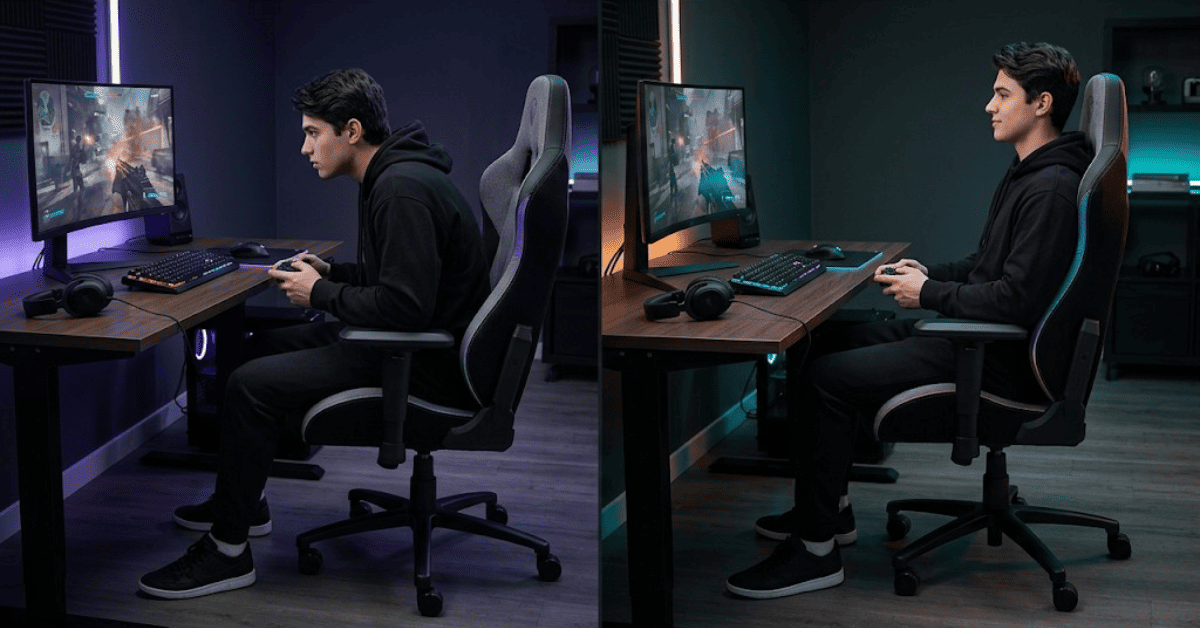
You are sitting right now. Maybe at a desk. Maybe in front of a screen. Maybe in a chair that costs more than your graphics card. Right? And somewhere in the back of your mind, there's a question that keeps coming up. Does gaming chair help posture? Or did I just pay a lot of money to sit badly in something that looks good?
It's the right question to ask. So let's actually answer it with real research, real physio perspective, and zero brand loyalty.
1 First, Here's The Problem Nobody Talks About
Before we talk about gaming chairs, let’s talk about sitting first. Sitting is already a problem. Research shows sitting puts 40% to 90% more pressure on your spinal discs than standing. That is a bi. Your spine is under real physical stress every single time you plant yourself in a chair.
Even when the body feels fine while sitting. Damage still builds slowly over time. Inside the body, spinal discs get compressed. Blood flow also slows down. Core muscles switch off because no demand is placed on them. Your hip flexors tighten up. Your glute muscles begin to deactivate. Doctors call that last thing "gluteal amnesia." Your backside literally forgets how to fire. And that puts more and more stress on your lower back and hips to pick up the slack.
According to Yale Medicine, prolonged sitting with poor posture leads to persistent postural problems, early muscle fatigue, weakened core muscles, and reduced spine flexibility over time. So sitting is already the challenge.
2 What Does 2025 and 2026 Research Actually Say?
Okay here's where it gets interesting. And a little surprising. A landmark study validated repeatedly through 2025 and 2026 follow-ups found that sitting at a perfect 90-degree upright angle actually increases disc pressure compared to a slight recline. Lowest spinal stress shows up at a 135-degree reclined position. So, sitting fully upright often feels “correct,” but it is not actually the best position.
That changes things.
A 2025 systematic review published in Spine Journal analysed 47 prospective cohort studies. The conclusion was clear. Postural variability means how much you move and change position. It is the strongest factor you can control that links to lower rates of long-term lower back pain in people who sit for work.
Not one specific angle. Not one perfect position. Movement. Variety. Constantly changing how you sit.
3 What Physiotherapists Say And It's Not What You Expect?
 Let's bring in the people who actually treat back pain patients every day. The physiotherapy community has become increasingly clear about what actually helps desk and gaming posture. Here's what named experts say.
Dr. Amy Hoover, physiotherapist, is direct about the core limitation: the human body cannot maintain good posture for hours without stress. In fact, this is not a personal failing, it is biology. A chair that supports the natural lumbar curve really matters. It helps your back when your muscles start to get tired. No proper support means the spine slowly collapses under its own weight.
Physiotherapist Lyndsay Hirst highlights something most people completely overlook: proper chair setup matters as much for your shoulders as for your lower back. She specifically points out that armrests are critical for people with neck and mid-back pain. Not just a comfort feature, but a structural one that offloads the upper body.
Dr. Lindsey Migliore, esports medicine physician and founder of GamerDoc, gives the clearest advice of all:
"Constant changes to your sitting posture are integral to healthy sitting. Avoid a seat that keeps you locked in a single sitting posture."
She warns directly against chairs, even well-designed ones. That feels so structured you stop shifting naturally. A good chair, in her view, facilitates movement. It does not prevent it. Her most-cited line in the ergonomics world, and the one that summarises the entire research base:
Your best posture is your next posture. 85 percent split between just two choices and still could not reach consensus on which was right. So the message from 2026 physio and ergonomics research is unanimous: stop seeking one perfect position. Seek movement.
4 What's Actually Happening in The Gaming Chair Market Right Now?
 Context matters here.Industry has changed a lot. In fact, the global gaming chair market will reach USD 1.65 billion in 2025. Next, growth moves to USD 1.78 billion in 2026. After that, the trend keeps going upward. Money is not the only shift. In fact, the reason behind growth matters more. According to 2026 market research, the fastest-growing segment includes hybrid gaming chairs. So, you can use these chairs to support both gaming and work use. Growth comes mainly from health awareness.
Recent data shows 60% of gamers feel discomfort after long sessions. Back pain is still the most common problem. Big brands like Secretlab, DXRacer, and Razer have changed their focus. Design now focuses more on real comfort and body support. It no longer focuses only on racing-style looks. Secretlab also says on its 2026 page that old ergonomic chair design belongs to the 1980s, not 2026.
Modern life has changed. People now use chairs for gaming, work, calls, and streaming in one day. One fixed posture no longer fits daily use. Industry has now started catching up with what physios have said for years. Movement matters. So, adjustability matters. One-size support does not work.
5 What a Gaming Chair Can Actually Do For You?
 Does gaming chair help posture? Now let's be specific. Here is what a good gaming chair genuinely does. It supports your spine when your muscles quit.
After a few hours, your back muscles tire. When they tire, they stop holding you upright. Your spine curls into a C-shape. That's when pain starts. A chair with a proper backrest and lumbar support fills in at that moment. It keeps your spine in a better shape even when your muscles are fatiguing. That is genuinely useful.
It reduces disc pressure through a slight recline. Remember the research above. In fact, sitting at a rigid 90 degrees puts more pressure on your discs than leaning slightly back. So a gaming chair with a recline function set to 100 to 110 degrees distributes your body weight better. Your spine shares the load with the backrest. Your muscles relax a little.
6 What a Gaming Chair Cannot Do?
 Here's what brands won't put in the product description. It cannot fix your posture automatically.
If you are buying a gaming chair and sitting in, it will not straighten your back. It won't heal existing pain. It won't undo years of slouching. A chair is a tool. Tools only work when used properly.
A badly set-up gaming chair makes things worse.
Lumbar support placed too high or too low forces your spine into an unnatural shape. Armrests at the wrong height make your shoulders shrug or lean sideways all day. So, a headrest that sits too far forward pushes your head down. All of these create more damage than having no support at all.
Cheap gaming chairs often prioritize looks over function.
Many budget gaming chairs are built to look like race car seats, dramatic side bolsters, fixed lumbar pillows, high backs. But those bolsters can restrict natural movement. Fixed pillows can't be adjusted to fit your specific spine. You end up locked in a position that looks ergonomic but isn't working for your body.
No chair replaces movement.
Now this is the hard truth. A 2025 Spine Journal review of 47 studies confirmed it: postural variability movement is the strongest factor in preventing chronic back pain. No chair, regardless of price, can replicate that. You cannot cancel out hours of stillness with a great chair. You also cannot cancel it out with an evening gym session. The damage happens during those long, frozen periods.
7 Now See the Five Adjustments That Create Real Results
 Okay a gaming chair can have every premium feature in the world. Still, it does nothing if it is not set up for your body. In fact, the real difference comes from these five adjustments. Yet most people skip all of them.
1. Seat Height The Foundation of Everything
Set your seat so your feet are flat on the floor, knees at roughly 90 degrees, and thighs parallel to the ground. If your feet are dangling, your pelvis tilts, your lumbar flattens, and every other adjustment you make becomes ineffective. This is your starting point. Adjust this before touching anything else.
Shorter users: use a footrest rather than raising the seat so high that your arms sit uncomfortably above desk level.
2. Lumbar Support The Most Misused Feature
Sit all the way to the back of the seat. Find the natural inward curve of your lower back — roughly at belt level. Position the lumbar support until it fills that curve with gentle, consistent pressure.
It should feel like steady support, not a push. Not pressure forcing you forward. Start with minimal depth and increase slowly until you feel the curve being held — not created.
The two most common mistakes: placing the lumbar too high (which pushes the mid-back instead of the lumbar) and cranking the depth too far (which forces an unnatural arch). Both cause more harm than no lumbar support at all.
3. Armrest Height Your Neck's Most Important Ally
Adjust armrests until your elbows sit at approximately 90 degrees and your shoulders are completely relaxed. Not shrugging. Not dropped to one side. Just hanging naturally, fully released.
If your shoulders are rising, the armrests are too high. If you're leaning sideways to reach them, they're too low. Both create neck and upper-back tension that compounds across every hour you sit. Correctly positioned armrests carry the weight of your arms away from your neck and shoulder muscles entirely.
4. Backrest Angle Stop Sitting Straight
Do not sit at 90 degrees. The research is clear: that position increases disc pressure compared to a slight recline.
Set your backrest between 100 and 110 degrees for active desk work and gaming. That slight lean-back lets the chair share your body weight. Your spinal muscles decompress. Now, proper lumbar support and correct setup help protect your spine during long sessions.
At the same time, breaks still matter. So, shift into a deeper recline.
5. Seat Depth The Adjustment Nobody Checks
Now, push your hips fully to the back of the chair. So, this helps support your body better. Next, keep a gap of two to three finger-widths between the seat edge and the back of your knees. If the gap is too small, the seat presses into the back of your knees. As a result, blood flow gets restricted.
8 Materials Matter More Than Most People Realise
Most buyers obsess over lumbar pillows and armrest adjustability. In fact they barely glance at the material. Then they wonder why their back is sweating and uncomfortable by hour four. Mesh and knit offer the best airflow by a wide margin. They run the coolest and dry the fastest. Firmest feel, pair with a thin cushion if needed. Best choice for long sessions or warm rooms.
Fabric is a solid middle ground. More breathable than PU, softer than mesh. Better for mixed work and gaming environments. Requires prompt stain treatment. PU and faux leather are the easiest to clean but trap heat significantly during long sessions. So they need conditioning to prevent cracking over time. Best suited to cooler climates or shorter sessions.
Foam density is frequently overlooked and critically important. Higher density foam resists compressing and preserves its support profile over time. Cheaper foam feels comfortable in a showroom and loses its shape within months. When a chair is described as "comfortable on day one," that often means soft foam which is exactly what stops supporting you after regular use.
9 Gaming Chair vs Regular Chair The Real Answer

10 So The One Thing Nothing Can Replace
Even the most perfectly adjusted, most expensive chair in the world cannot solve one thing.
Well, sitting still for too long.
The 2025 Spine Journal review said it plainly: postural variability is the most important factor. Your discs receive nutrients through movement if you stay frozen for hours, that nutrient exchange stops. Over months and years, that accelerates disc degeneration.
But think of your spinal disc like a sponge. Movement wrings it out and draws fresh fluid in. Stillness leaves it stagnant. Get up every 30 to 60 minutes. You don't need a workout. Walk to the kitchen. Roll your shoulders back. Extend your spine for a few seconds. Just break the static position before your body locks into it.
That habit alone does more for your long-term spinal health than any chair upgrade.
Conclusion
Okay, here it is, straight. A gaming chair can genuinely help your posture. But only under specific conditions. You need to choose one that actually fits your body size. You need to set it up properly before you dismiss it. And you need to move regularly throughout your session, because no chair in the world compensates for hours of stillness. In fact, a well-adjusted gaming chair supports your back when your muscles get tired. But it's a tool, not a cure. It makes good posture easier to hold. It doesn't hold it for you.
Buy a chair that fits. Adjust it properly. Move often. And remember the most important thing every physiotherapist in 2026 will tell you:
Your best posture is always your next one.

Snober Kanwal
Tech Reviewer, Content SpecialistI specialize in tech journalism and product reviews at CouponsBeast. By breaking down digital trends, gadgets, and software into easy-to-digest guides, I create SEO-optimized content that ranks on search engines, builds consumer trust, and drives high-intent affiliate traffic for global audiences.
Comments 0
No comments yet. Be the first to share your thoughts!