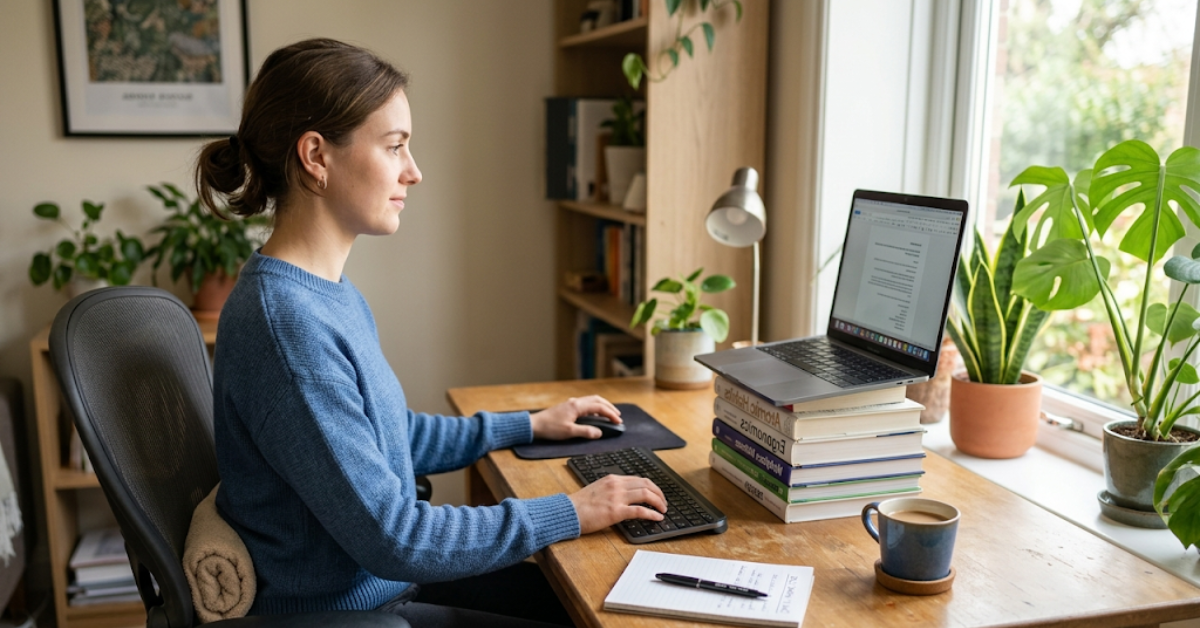
You have been working from home for a while now. Maybe your neck hurts by 3 PM. Maybe your lower back aches by the end of the day. Maybe your eyes burn after a long meeting marathon. And here's the frustrating part, you haven't bought a single ergonomic product yet, because you are not sure what's actually worth it.
But good news. Most of what's hurting you can be fixed for free. Right now, today, with zero money spent.
Yes, the best ergonomic home office setup doesn't start with a shopping cart. It starts with understanding what your body needs, and then making small adjustments that cost nothing. Only after you have done that should you consider gear. So let's go in that order.
1 Why Your Current Setup Is Probably Hurting You?

Most office workers spend hours sitting every day. Many people working from home do the same. Right, the problem starts when you work from whatever chair you can find. Maybe it is a dining chair. Maybe it is your couch. Maybe it is a kitchen stool. Screen setup often makes things worse. But your screen often sits too low, too close, or at a weird angle.
Your body does not like staying in one position for hours. So remote work is not the real problem. Poor posture is. Now you need to know what good posture looks like. Good posture keeps everything in line. Right? Spine stays in its natural position. And shoulders stay relaxed. Wrists stay straight.
Keep hips at 90–110 degree angle. See, small changes help a lot. So it is worth fixing your setup early. So it is worth getting your setup right before pain becomes a daily problem. That's the target. Now let's get you there for free.
2 The No-Cost Fixes That Actually Work

You do not need expensive gear to feel more comfortable. Because a few simple adjustments can make a big difference throughout the day.
Fix Your Screen Height First
You should keep your monitor at a comfortable distance. Aim for about 20 to 40 inches from your eyes. Okay the top of your screen should sit at eye level or slightly below. Many people place their monitors too low. Right, the screen sitting directly on a desk makes you look down all day. Head starts leaning forward. In fact, the neck works harder than it should. Also, shoulders can start to feel tight.
So it is worth raising your screen. Small change and big difference. Do that for eight hours and your neck muscles work overtime. That's the tension you feel at the end of the day.
Now the fix is embarrassingly simple. Stack some books under your monitor or laptop. Use thick books to raise your monitor. If the screen sits too low, place books, boxes, or a riser under it. Also, keep your posture straight. Then check your eyes position. So your eyes should land on the top third of the screen. Not the bottom. Not the center. The top third.
Okay a quick test: extend your arm toward the screen your fingertips should nearly touch it. That's the right distance. If you're on a laptop, understand that laptop screens are inherently bad for posture. If you are using a laptop at your desk, it can lead to discomfort because of the low screen height and cramped keyboard. If you have a separate monitor, use it. If not, take the laptop on books and pair it with any spare keyboard and mouse you have lying around.
Keyboard and Mouse Position
Keyboard position matters more than you think. Keep elbows near 90 degrees. Also, keep wrists straight. Hands should stay relaxed on the keyboard. Now a common mistake shows up here. So the desk often sits too high for your arms. Most dining tables are not made for typing. So many people get shoulder and wrist pain at home.
So if needed, raise your chair to match keyboard height. It is worth fixing early.
But then your feet might not reach the floor. So grab a box, a footstool, a stack of thick books, anything that lets your feet rest flat. So this matters for circulation and for keeping your pelvis in the right position.
Your keyboard should be flat or with a slight negative tilt meaning the front edge is higher than the back. It supports neutral wrists. You have to keep the keyboard close enough that your elbows stay near your sides.
Chair Adjustments You Are Probably Skipping
If your chair has any adjustability at all, use it. Most people use the chair as it comes. No adjustments at all. Now adjust your seat height. Keep feet flat on the floor or on a footrest. Also, keep thighs close to parallel with the ground. Knees should sit around a 90-degree angle when you sit. Back pain is a serious issue. Now check your back support. Does your lower back actually touch the chair?
Most people lean slightly forward, which removes all back support entirely. Push your hips back into the seat, let the backrest do its job, and feel the difference. If your chair has no lumbar support at all, roll a small towel and place it behind your lower back. Yes, really. It works. You don't need to spend anything.
The Lighting Fix Nobody Talks About
Screen glare acts like a silent enemy. Adjust screen brightness so it matches the room light. Reduced glare helps ease eye strain a lot. Lower screen brightness as well. Most people keep it set too high at full level.
Match it to the ambient light in your room. Your eyes will thank you within an hour.
3 The Break Problem

Okay, here's the truth nobody likes to hear: you can have a perfect setup and still hurt yourself just by sitting too long without moving. Right? Workers who took active breaks every 30 minutes showed markedly better results than those who sat continuously.
So breaks aren't optional. In fact they are part of the setup.
You should follow the 20-20-20 rule. Every 20 minutes, stop for a moment. Give your eyes a 20-second break. Then, look far away, around 20 feet. See, your eyes work hard when you stare at screens too long. So this small habit helps them relax and feel less tired. That constant focus creates strain. Now shift your gaze to something far. Your eye muscles relax. It helps reduce strain, blurry vision, and headaches. Set a phone timer if you need a reminder. It costs nothing.
4 Now, Gear That's Actually Worth Buying

Once you have done the free fixes, you will notice a real improvement. But there are a few products that genuinely solve problems the free fixes can't fully address. So here's what's worth your money and what is not.
A Lumbar Cushion (If Your Chair Has No Back Support)
If you're sitting in a dining chair with a flat back, no rolled towel is going to cut it long-term. A proper lumbar support cushion is shaped to follow the natural curve of your lower back. It keeps your spine in the right position without you having to think about it.
No need to spend much here. And a good memory foam lumbar cushion usually costs around $25 to $50. Pick one with an adjustable strap so it stays in place and does not slip down during the day. If back pain shows up often, the first small upgrade is worth getting.
A Monitor Arm or Stand
Books work but a proper monitor arm gives you full flexibility. So you can raise, lower, tilt, and swivel your screen in seconds. An under-desk keyboard tray paired with a monitor arm lets you set the desk height for your screen independently from your arm and keyboard position which creates a fully ergonomic system.
So a basic monitor stand (not a full arm) costs $20–$40. In fact a proper adjustable arm costs $50–$120. If you work long hours and your neck bothers you regularly, the arm is worth it. If you just need elevation, a stand works fine.
A Footrest (For Shorter People Especially)
If you have raised your chair to get the right keyboard height but now your feet don't fully reach the floor, a footrest fills that gap. You can start with a large book or a box. If that works for you, great — buy a proper footrest for $30–$55 when you're ready for something purpose-built. The foam quality matters. Cheap foam compresses flat within months.
An External Keyboard and Mouse (For Laptop Users)
Laptop users should pay attention here. So, a small upgrade makes a big difference. External keyboard and mouse help you work in a better position. The laptop stand lifts the screen to eye level. Setup starts to feel like a proper desktop. In fact, the body stops bending forward all the time. So you avoid bad posture that comes from using a laptop alone.
So a basic wired keyboard and mouse combo costs $20–$30. Wireless costs a little more.
An Ergonomic Chair (When You're Ready)
Your proper adjustable chair is the biggest upgrade. So you can make it the most expensive. Then look for one with adjustable seat height, lumbar support you can position, and armrests. You don't need to spend $1,000. Right?
Several mid-range chairs in the $200–$400 range do the job well. What matters is adjustability, not brand name. Before buying, adjust everything. If a chair doesn't let you get your feet flat, your elbows at keyboard height, and your lower back supported simultaneously it's not the right chair for your body.
5 The Order Is Everything
Well here's the thing most ergonomics guides get backwards. See they show you expensive gear first, and free fixes as an afterthought.
Do it the other way. Spend a day making the adjustments in this article. Take your screen. Pull your keyboard closer. Raise your chair. Set a 20-minute eye break reminder and push your hips into the backrest.
Then notice what still hurts after a week. Back still aching? Start with a lumbar cushion. Neck still bothering you? Look at a monitor arm. Feet dangling? Get a footrest.
Buy to solve a specific problem, not to complete a set.
Research shows that proper ergonomic setup can reduce work-related musculoskeletal disorders significantly. But that research is about correct positioning not about owning the right products.
So the best ergonomic home office setup is one you actually use every day. Proper positioning matters far more than owning lots of equipment
. That starts with the free stuff. And most of the time, the free stuff gets you 80% of the way there.
Start today. Stack some books. Move the mouse pad. Set the timer. Your body will feel it by tomorrow.
6 At a Glance: Gear Worth Buying and When to Buy It

7 Your Body Tells You What to Fix Next
Okay the best ergonomic home office setup is the one that's adjusted to your actual body, in your actual space, on your actual budget. It doesn't look the same for everyone. You have to start with what costs nothing. Screen height, keyboard position, chair adjustment, lighting, and movement breaks. No doubt these five free fixes solve the majority of the pain that remote workers deal with every day. Do them first, do them properly, and give it a week.
After that, let your body guide the spending. Still hurting somewhere specific? That's your signal. Spend on the one thing that solves that one problem. Your home office does not need to be expensive to feel good. It just needs to be set up right.

Snober Kanwal
Tech Reviewer, Content SpecialistI specialize in tech journalism and product reviews at CouponsBeast. By breaking down digital trends, gadgets, and software into easy-to-digest guides, I create SEO-optimized content that ranks on search engines, builds consumer trust, and drives high-intent affiliate traffic for global audiences.
Comments 0
No comments yet. Be the first to share your thoughts!