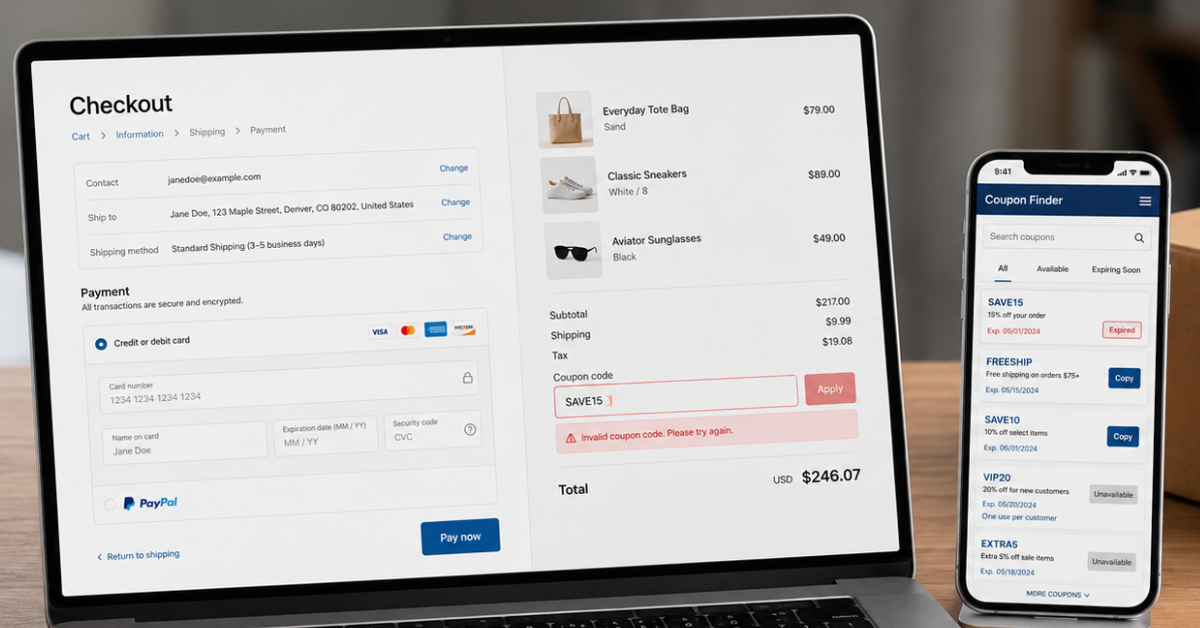
Coupon codes fail when the code, cart, customer account, store region, or checkout method does not meet the promotion rules. The most common causes include expired offers, minimum purchase requirements, product exclusions, account restrictions, prior use, and conflicts with other discounts.
According to the official WooCommerce coupon documentation, retailers can restrict coupons by cart value, eligible products, sale items, customer email addresses, and usage limits. The Shopify Help Center also confirms that checkout systems reject codes when cart items do not qualify or multiple discounts cannot be combined. These rules explain why a valid coupon code can still fail at checkout.
What Does Each Coupon Error Message Mean?
Checkout messages differ between stores, but their wording often points to the cause of the problem.
Platforms such as Couponbeast focus on helping shoppers discover available promotions, but shoppers should always review the final terms directly from the retailer. For detailed explanations of promotion rules, discount restrictions, and common checkout issues, explore our trusted blogs about coupons for practical guidance.

Quick Coupon Code Troubleshooting Checklist
Follow these steps in order when a coupon code is not working:
Copy the code again and remove spaces before or after it.
Confirm the activation and expiration dates.
Read the minimum spend, quantity, and product requirements.
Log in with the email address that received the offer.
Check the website region, currency, and sales channel.
Remove other codes or automatic promotions.
Select any required payment or delivery method.
Open a fresh private browser window and rebuild the cart.
Ask the retailer to confirm the code terms if the error continues.
1. The Coupon Has Expired or Is Not Active Yet
An expired or inactive campaign is one of the most common reasons a coupon fails. Retailers set specific start and end dates, and the checkout system rejects the code outside that promotion window.
An old code can remain visible in search results, social posts, emails, browser extensions, or coupon databases long after the retailer ends the offer. A code can also appear before its official start time. Store time zones create further confusion when a promotion starts or ends at midnight in a different region.
To fix the problem, check both the start and expiration dates instead of looking only for an expiration date. Compare the retailer’s stated time zone with your local time and confirm that the merchant still displays the promotion. If the campaign has ended, use a more recent offer.
2. Your Cart Does Not Meet the Spend or Quantity Requirement
A valid coupon can fail when the cart falls below a minimum subtotal or does not contain the required number of items. Some promotions also set a maximum purchase amount.
For example, a “$20 off orders over $100” code will not apply to an $85 cart. The checkout can calculate the qualifying amount from eligible merchandise only, so taxes, shipping charges, gift cards, and excluded products do not always count toward the threshold.
Review the promotion terms and compare the required amount with the eligible subtotal shown in your cart. If the offer requires three items, confirm that all three qualify. Do not add unwanted products solely to reach a threshold unless the final order cost still makes financial sense.
3. Your Cart Contains Excluded Products
Retailers often limit coupons to specific products, brands, collections, categories, or product variants. Common exclusions include gift cards, clearance products, subscriptions, limited editions, newly released items, and products already on sale.
Even offers described as “sitewide” can contain exclusions in the full terms. A discount can apply to one item in the cart while leaving another item at full price. Some checkout systems reject the entire code when any restricted product appears in the order.
Remove the suspected product temporarily and apply the code again. If the discount appears, check the terms to identify the exact exclusion. Compare the sale price with the coupon price before replacing a discounted item with a full-price alternative.
4. The Offer Is Limited to Certain Customers
Some promo codes only apply to a specific customer group. Common examples include first-time buyers, loyalty members, newsletter subscribers, students, military personnel, healthcare workers, app members, or customers selected for a private campaign.
Personal codes can also connect to a particular email address or account. This explains why a code works for another shopper but fails for you. The checkout system checks the account details rather than the code alone.
Sign in with the same email address that received the offer and confirm your membership or verification status. If the promotion applies only to new customers, a previous purchase under the same email, phone number, address, or payment account can affect eligibility. Choose a public offer if your account does not qualify.
5. You Are on the Wrong Regional Website
Many retailers operate separate stores for the United States, Canada, the United Kingdom, Australia, and other markets. Each storefront can have different prices, currencies, inventories, and coupon campaigns.
A US coupon often fails on a Canadian or international checkout. The system can identify the store region through the website domain, account country, currency, delivery address, or checkout configuration. A VPN can also create a conflict between your apparent location and delivery address.
Confirm that the website region, currency, account country, and shipping address match the promotion. If the email came from a US campaign, use the official US store. Avoid changing regions solely for a discount if the alternative store creates higher shipping costs, import charges, or delivery restrictions.

6. The Coupon Only Works Through a Specific Sales Channel
A promotion can apply only through the retailer’s mobile app, website, physical store, email link, text-message link, or marketplace page. Entering the same code through another channel will not satisfy the campaign rules.
App-exclusive offers often require the customer to complete the entire order inside the mobile app. Email promotions can depend on a personalized link that adds campaign data to the browser session. Some offers also apply only at a physical register or through a retailer’s direct website.
Return to the original promotion and check where the retailer instructs customers to shop. Open the app, email link, or correct store page before you rebuild the cart. A code labeled “app only” will not work through a standard website checkout.
7. You Have Already Used the Coupon
Retailers frequently limit a coupon to one use per customer. The checkout can track prior use through an account, email address, phone number, payment method, or order history.
A canceled order can also affect a one-use code if the retailer’s system records the promotion before the cancellation. The exact policy depends on the merchant, so placing the same order again does not guarantee that the discount will return.
Check your account’s order history and search your email for a prior purchase that used the code. If a canceled order caused the problem, contact the retailer and ask if it can restore the offer. Otherwise, select another promotion for which your account qualifies.
8. The Promotion Has Reached Its Total Usage Limit
Retailers can cap the total number of times all customers can use a code. The offer can therefore stop before its stated expiration date.
For example, a campaign can offer 25% off to the first 1,000 customers. Once the checkout records 1,000 successful uses, the system disables the promotion. The code can still appear on an old page or social post even though no additional uses remain.
A shopper cannot correct this restriction from the cart. Look for another current offer, check the retailer’s official sale page, or choose an account-specific discount. Recent verification details offer more value than an expiration date alone for campaigns with limited use.
9. The Code Contains a Typing or Formatting Error
A missing letter, extra space, incorrect number, or incomplete code can cause an otherwise valid coupon to fail. Characters such as the letter “O” and the number “0” are easy to confuse.
Case sensitivity varies between retailers, but entering the code exactly as published remains the safest approach. Codes copied from formatted emails or social posts can also include hidden spaces or punctuation.
Copy the code from its original source and paste it into a plain text field first. Check every character, remove spaces from both ends, and confirm that the copy includes all letters, numbers, and hyphens. Then paste it into the retailer’s coupon box and press the apply button once.

10. Another Discount Conflicts With the Coupon
Retailers control which discounts customers can combine. A code can conflict with another promo code, an automatic sale, a bundle offer, free shipping, a loyalty reward, employee pricing, or a referral discount.
The rule differs between stores. Shopify, for example, supports multiple discount codes only when the merchant configures those discount types to combine. WooCommerce lets the retailer mark a coupon for individual use, which blocks other coupons.
Remove each existing promotion and apply the new code by itself. If both offers work separately, compare the final totals and keep the better option. A larger percentage does not always produce the lowest price because product exclusions and maximum discount caps can change the result.
11. The Offer Requires a Specific Payment or Delivery Method
Some discounts depend on a qualifying credit card, digital wallet, store card, installment provider, shipping service, or pickup method. The code can appear valid at first and disappear after the customer changes the payment or delivery option.
A free-shipping code can also exclude express delivery, oversized products, remote addresses, or international orders. Subscription promotions can require an auto-renew plan instead of a one-time purchase.
Read the terms for payment, shipping, and subscription requirements. Select the required option and confirm that the discount appears in the order summary before you submit payment. Do not choose a costly credit product solely to receive a small discount.
12. The Required or Free Item Is Missing From the Cart
Buy-one-get-one, free-gift, and bundle promotions often require customers to add every qualifying item to the cart. The retailer does not always add the free or discounted product automatically.
For example, a “buy two, get one free” code usually requires three eligible units in the cart. If you add only two, the checkout has no third item to discount. The offer can also restrict the free item by size, color, category, or price.
Review the required quantity and add the stated gift or discounted product before you apply the code. Confirm that each item belongs to the eligible collection. The order summary should show which product received the discount.
13. A Browser or Checkout Error Is Blocking the Promotion
A stale checkout session, duplicate browser tab, account error, extension conflict, or temporary website fault can prevent a valid code from applying. However, technical fixes should come after you check the promotion terms because browser changes cannot override an eligibility rule.
Start by refreshing the checkout and signing in again. Close duplicate tabs, disable coupon extensions temporarily, or open a private browser window. If necessary, try another browser or device and rebuild the cart from the retailer’s official website.
Contact customer support if the error continues. Provide the exact code, a screenshot of the message, the items in your cart, the promotion source, and the time of the attempt. These details help the retailer distinguish a technical fault from a restriction.
Conclusion
Coupon codes usually fail because they are expired, restricted, personalized, limited by usage rules, unavailable for certain products, or blocked by retailer checkout conditions. The solution is not simply trying random codes. The best approach is understanding how promotions work, checking eligibility rules, and using reliable coupon sources. Moreover, Coupon websites that publish verified coupons often explain what is a coupon code? and show clear verification dates, eligibility requirements, expiration information, and retailer-specific restrictions.
FAQs
Why is my coupon code invalid?
A coupon code can appear invalid because it has expired, contains a typing error, has reached its usage limit, or has not started yet. Copy the code again and check its promotion dates and terms.
Why is an active coupon code not applying to my order?
An active code will still fail if your cart does not meet the minimum spend, product, quantity, payment, or delivery requirements. Check the qualifying subtotal and remove excluded products.
Why does a coupon code work for someone else but not me?
Some coupons only apply to new customers, loyalty members, selected accounts, specific locations, or the email address that received the offer. Sign in to the correct account and confirm your eligibility.
Can I use more than one coupon code on the same order?
The retailer’s coupon-stacking policy determines this. Some stores accept compatible discounts, while others allow only one code per order. Test each offer separately and keep the one that provides the lowest final price.
What should I do if a valid coupon code still does not work?
Review the offer terms, remove other discounts, confirm the store region, and try a fresh private browser window. If the error continues, contact the retailer with the code, cart details, and a screenshot of the checkout message.

Noman
Content WriterNoman is a content writer at CouponsBeast, where he researches and writes about coupon codes, cashback deals, and money-saving strategies for online shoppers. He focuses on breaking down how discount codes work, testing offers before they're published, and helping readers avoid expired or invalid coupons. His writing covers deals across [categories — e.g., fashion, electronics, travel, groceries], with an emphasis on practical, easy-to-follow savings tips.
Comments 0
No comments yet. Be the first to share your thoughts!